
html/css 使用Canvas生成公司公章方法
发表时间:2026-05-29 12:16:41
文章作者:小编
浏览次数:
HTML生成公章代码如下:
<!DOCTYPE html>
<html lang="zh-CN">
<head>
    <meta charset="UTF-8">
    <meta name="viewport" content="width=device-width, initial-scale=1.0">
    <title>电子公章生成(含已验证副章)— 速光网络</title>
    <style>
        * { margin: 0; padding: 0; box-sizing: border-box; }
        body {
            min-height: 100vh; display: flex; flex-direction: column;
            align-items: center; padding: 40px 20px;
            background: linear-gradient(135deg, #1e3a5f 0%, #4c549c 100%);
            font-family: "Microsoft YaHei", sans-serif; color: #333;
        }
        .card {
            background: #fff; border-radius: 14px; padding: 32px 36px;
            width: 100%; max-width: 560px;
            box-shadow: 0 20px 60px rgba(0,0,0,0.3);
        }
        h1 { font-size: 22px; color: #1e3a5f; margin-bottom: 6px; }
        .subtitle { font-size: 13px; color: #888; margin-bottom: 24px; }
        label { display: block; font-size: 13px; color: #555; margin-bottom: 6px; font-weight: 500; }
        input[type="text"] {
            width: 100%; padding: 11px 14px; border: 1px solid #d0d4d8;
            border-radius: 6px; font-size: 14px; outline: none;
            font-family: "Microsoft YaHei", sans-serif;
            transition: border-color 0.15s;
        }
        input[type="text"]:focus { border-color: #1e3a5f; }
        .row { margin-bottom: 14px; }
        .row-2col { display: grid; grid-template-columns: 1fr 1fr; gap: 12px; }

        /* 主预览区(Canvas 公章 + HTML/CSS 副章) */
        .seal-content {
            position: relative;
            width: 100%; min-height: 280px;
            display: flex; justify-content: center; align-items: center;
            padding: 40px 20px;
            background: #fafafa;
            border: 2px dashed #d0d4d8; border-radius: 10px;
            margin: 18px 0 16px;
        }
        /* 公章按真实物理尺寸 4.2cm × 4.2cm 显示(标准合同专用章规格) */
        canvas#sealCanvas {
            display: block;
            width: 4.2cm; height: 4.2cm;
        }

        /* HTML/CSS 实现的小副章(来自参考文章的 .seal-result 模式) */
        .seal-result {
            width: 56px; height: 56px;
            transform: rotate(-18deg);
            border: solid 2px #28a745;
            border-radius: 100%;
            text-align: center;
            color: #28a745;
            font-size: 12px;
            font-weight: bold;
            line-height: 1.05;
            display: flex; align-items: center; justify-content: center;
            position: absolute;
            right: calc(50% - 4.2cm/2 - 12px); bottom: 30px;
            background: rgba(255,255,255,0.7);
            backdrop-filter: blur(2px);
        }
        .seal-result span {
            display: block; padding: 0 4px; letter-spacing: 1px;
        }

        .btn-row { display: flex; gap: 10px; }
        .btn {
            flex: 1; padding: 11px; border: none; border-radius: 6px;
            font-size: 14px; font-weight: 600; cursor: pointer;
            transition: all 0.18s; font-family: "Microsoft YaHei", sans-serif;
        }
        .btn-primary { background: #1e3a5f; color: #fff; }
        .btn-primary:hover { background: #2d5a87; }
        .btn-secondary { background: #f0f2f5; color: #555; }
        .btn-secondary:hover { background: #e6e9ee; }
        .hint {
            font-size: 11px; color: #999; margin-top: 12px;
            text-align: center; line-height: 1.7;
        }
        .toggle {
            display: flex; align-items: center; gap: 6px;
            font-size: 13px; color: #555; cursor: pointer; user-select: none;
            margin-top: 10px;
        }
        .toggle input { margin: 0; cursor: pointer; }

        .advanced {
            margin-top: 4px; padding: 14px; background: #f7f8fa; border-radius: 8px;
        }
        .advanced-title {
            font-size: 12px; color: #777; font-weight: 600; margin-bottom: 10px;
            letter-spacing: 0.5px;
        }
        .controls-grid {
            display: grid; grid-template-columns: 1fr 1fr; gap: 12px 16px;
        }
        .control { font-size: 12px; }
        .control label { font-size: 12px; color: #555; margin-bottom: 4px; }
        .control .val { color: #1e3a5f; font-weight: 600; margin-left: 4px; }
        .control input[type="range"] { padding: 0; height: 18px; width: 100%; }
    </style>
</head>
<body>

<div class="card">
    <h1>电子公章生成(含已验证副章)</h1>
    <p class="subtitle">参考阿里云开发者社区方案:Canvas 主章 + HTML/CSS 旋转副章</p>

    <div class="row">
        <label for="companyName">公司全称</label>
        <input type="text" id="companyName" value="北京速光网络科技有限公司" maxlength="30">
    </div>

    <div class="row row-2col">
        <div>
            <label for="bottomText">底部横排文字</label>
            <input type="text" id="bottomText" value="合同专用章" maxlength="12">
        </div>
        <div>
            <label for="badgeText">右下副章文字</label>
            <input type="text" id="badgeText" value="已验证" maxlength="6">
        </div>
    </div>

    <!-- 弧排公司名 — 专业制章参数(按真实尺寸 4.2cm 圆章计算) -->
    <div class="advanced">
        <div class="advanced-title">弧排公司名(宋体 / 4.2cm 圆章基准)</div>
        <div class="controls-grid">
            <div class="control">
                <label>字体高度 <span class="val" id="vH">7.0</span> mm</label>
                <input type="range" id="fontHeight" min="3" max="12" value="7" step="0.1">
            </div>
            <div class="control">
                <label>宽度比例 <span class="val" id="vWR">60</span> %</label>
                <input type="range" id="widthRatio" min="30" max="100" value="60" step="1">
            </div>
            <div class="control">
                <label>占用角度 <span class="val" id="vSpan">210</span> °</label>
                <input type="range" id="arcSpan" min="120" max="280" value="210" step="1">
            </div>
            <div class="control">
                <label>文字内移 <span class="val" id="vIn">0.80</span> mm</label>
                <input type="range" id="textInset" min="0" max="3" value="0.8" step="0.05">
            </div>
        </div>
        <label class="toggle"><input type="checkbox" id="textBold" checked> 粗体</label>
    </div>

    <!-- 底部"合同专用章" — 专业制章参数 -->
    <div class="advanced">
        <div class="advanced-title">底部横排"合同专用章"(宋体)</div>
        <div class="controls-grid">
            <div class="control">
                <label>字体高度 <span class="val" id="vBH">5.6</span> mm</label>
                <input type="range" id="botFontH" min="3" max="10" value="5.6" step="0.1">
            </div>
            <div class="control">
                <label>宽度比例 <span class="val" id="vBWR">60</span> %</label>
                <input type="range" id="botWidthRatio" min="30" max="100" value="60" step="1">
            </div>
            <div class="control">
                <label>位置下移 <span class="val" id="vBY">4.00</span> mm(字底距外圈内移)</label>
                <input type="range" id="botY" min="0" max="18" value="4" step="0.1">
            </div>
            <div class="control">
                <label>字体间距 <span class="val" id="vBS">0.20</span> mm</label>
                <input type="range" id="botSpacing" min="0" max="2" value="0.2" step="0.05">
            </div>
        </div>
        <label class="toggle"><input type="checkbox" id="botBold" checked> 粗体</label>
    </div>

    <label class="toggle">
        <input type="checkbox" id="showBadge" checked> 显示右下角"已验证"副章
    </label>

    <div class="seal-content">
        <canvas id="sealCanvas" width="320" height="320"></canvas>
        <div class="seal-result" id="badge"><span id="badgeContent">已<br>验证</span></div>
    </div>

    <div class="btn-row">
        <button class="btn btn-secondary" onclick="resetDefaults()">恢复默认</button>
        <button class="btn btn-primary" onclick="downloadPng()">下载主章 PNG</button>
    </div>

    <p class="hint">
        主章:Canvas 圆环 + 弧排公司名 + 中央五角星 + 底部横排"合同专用章"<br>
        副章:HTML/CSS 旋转 -18° 的绿色边框圆,悬浮在主章右下角(导出 PNG 不含副章,仅主章)
    </p>
</div>

<script>
const canvas = document.getElementById('sealCanvas');
const ctx = canvas.getContext('2d');
// 物理尺寸:4.2cm × 4.2cm(标准合同专用章规格)
// 内部分辨率使用 6 倍(保证打印 ≈350 DPI 高清);显示尺寸通过 CSS width:4.2cm 控制
const SCALE = Math.max(window.devicePixelRatio || 1, 6);
const CSS_W = 320, CSS_H = 320;  // 绘图坐标系(保持原算法不变)

(function initCanvas() {
    canvas.width = CSS_W * SCALE;
    canvas.height = CSS_H * SCALE;
    // canvas.style.width / height 已由 CSS 设为 4.2cm
    ctx.scale(SCALE, SCALE);
})();

function drawSeal() {
    const name = (document.getElementById('companyName').value || '').trim();
    const bottomText = (document.getElementById('bottomText').value || '').trim();

    const cx = CSS_W / 2;
    const cy = CSS_H / 2;
    const ringR = 140;
    const lineWidth = 5;

    ctx.clearRect(0, 0, CSS_W, CSS_H);

    // 1. 外圈红色圆环
    ctx.strokeStyle = '#c00';
    ctx.lineWidth = lineWidth;
    ctx.beginPath();
    ctx.arc(cx, cy, ringR, 0, Math.PI * 2);
    ctx.stroke();

    // 2. 中央红色五角星(参考文章里的 create5star 函数)
    create5star(ctx, cx, cy, 48, '#c00', 0);

    // 3. 上半弧公司名
    if (name) drawArcText(ctx, name, cx, cy, ringR);

    // 4. 底部横排文字(如"合同专用章") — 专业制章参数
    if (bottomText) drawBottomText(ctx, bottomText, cx, cy);
}

// 底部横排文字 — 支持字高/宽度比例/字间距/位置/粗体
// 位置下移:字底距外圈下边的内移距离(mm),符合专业制章软件常用语义
function drawBottomText(ctx, text, cx, cy) {
    const fontMM = parseFloat(document.getElementById('botFontH').value);
    const widthRatioPct = parseInt(document.getElementById('botWidthRatio').value, 10);
    const yInsetMM = parseFloat(document.getElementById('botY').value);
    const spacingMM = parseFloat(document.getElementById('botSpacing').value);
    const bold = document.getElementById('botBold').checked;

    // 同步显示值
    document.getElementById('vBH').textContent = fontMM.toFixed(1);
    document.getElementById('vBWR').textContent = widthRatioPct;
    document.getElementById('vBY').textContent = yInsetMM.toFixed(2);
    document.getElementById('vBS').textContent = spacingMM.toFixed(2);

    const fontSize = fontMM * MM_TO_UNIT;
    const widthRatio = widthRatioPct / 100;
    const spacing = spacingMM * MM_TO_UNIT;
    // 外圈底部 = cy + ringR(140) 。文字底边在外圈下边向内 yInsetMM 处
    const ringR = 140;
    const textBottomY = cy + ringR - yInsetMM * MM_TO_UNIT;
    const yPos = textBottomY - fontSize / 2;

    ctx.fillStyle = '#c00';
    ctx.textBaseline = 'middle';
    ctx.textAlign = 'left';
    ctx.font = (bold ? 'bold ' : '') + fontSize + 'px "SimSun", "宋体", serif';

    // 先计算总宽(每个字横向压缩 widthRatio + 字间距)
    let totalWidth = 0;
    const charWidths = [];
    for (let i = 0; i < text.length; i++) {
        const w = ctx.measureText(text[i]).width * widthRatio;
        charWidths.push(w);
        totalWidth += w;
        if (i < text.length - 1) totalWidth += spacing;
    }

    // 从居中位置的左边缘开始绘制(textAlign=left + 平移到左边缘)
    let currentX = cx - totalWidth / 2;
    for (let i = 0; i < text.length; i++) {
        ctx.save();
        ctx.translate(currentX, yPos);
        ctx.scale(widthRatio, 1);
        ctx.fillText(text[i], 0, 0);
        ctx.restore();
        currentX += charWidths[i] + spacing;
    }
}

// 参考文章中提到的五角星绘制函数
// 参数:ctx, 中心 x, 中心 y, 外接半径, 颜色, 旋转角度(0=正上方)
function create5star(ctx, sx, sy, radius, color, rotate) {
    ctx.save();
    ctx.translate(sx, sy);
    ctx.rotate(rotate);
    ctx.beginPath();
    const innerR = radius * 0.45;
    for (let i = 0; i < 10; i++) {
        const r = i % 2 === 0 ? radius : innerR;
        const angle = (Math.PI / 5) * i - Math.PI / 2;
        const x = r * Math.cos(angle);
        const y = r * Math.sin(angle);
        if (i === 0) ctx.moveTo(x, y); else ctx.lineTo(x, y);
    }
    ctx.closePath();
    ctx.fillStyle = color;
    ctx.fill();
    ctx.restore();
}

// 弧排公司名 — 专业制章参数(毫米单位、宋体、宽度比例、占用角度、文字内移)
// 坐标系换算:4.2cm = 42mm → 320 单位;1mm = 320/42 ≈ 7.619 单位
const MM_TO_UNIT = 320 / 42;

function drawArcText(ctx, text, cx, cy, ringR) {
    if (!text) return;

    // 读取专业制章参数
    const fontHeightMM = parseFloat(document.getElementById('fontHeight').value);
    const widthRatioPct = parseInt(document.getElementById('widthRatio').value, 10);
    const arcSpanDeg = parseInt(document.getElementById('arcSpan').value, 10);
    const insetMM = parseFloat(document.getElementById('textInset').value);
    const bold = document.getElementById('textBold').checked;

    // 同步显示值
    document.getElementById('vH').textContent = fontHeightMM.toFixed(1);
    document.getElementById('vWR').textContent = widthRatioPct;
    document.getElementById('vSpan').textContent = arcSpanDeg;
    document.getElementById('vIn').textContent = insetMM.toFixed(2);

    // 物理单位 → canvas 坐标
    const fontSize = fontHeightMM * MM_TO_UNIT;          // 字高
    const inset = insetMM * MM_TO_UNIT;                  // 内移
    const widthRatio = widthRatioPct / 100;              // 0.6 即 60% 横向压缩
    const arcSpan = (arcSpanDeg * Math.PI) / 180;        // 弧度
    // 文字中心半径 = 外圈半径 - 文字内移 - 字高/2(让字外缘距圆边为 inset)
    const textRadius = ringR - inset - fontSize / 2;

    ctx.fillStyle = '#c00';
    ctx.textAlign = 'center';
    ctx.textBaseline = 'middle';
    ctx.font = (bold ? 'bold ' : '') + fontSize + 'px "SimSun", "宋体", serif';

    const startAngle = -Math.PI / 2 - arcSpan / 2;
    const step = text.length > 1 ? arcSpan / (text.length - 1) : 0;

    for (let i = 0; i < text.length; i++) {
        const a = startAngle + step * i;
        ctx.save();
        ctx.translate(cx + textRadius * Math.cos(a), cy + textRadius * Math.sin(a));
        ctx.rotate(a + Math.PI / 2);
        ctx.scale(widthRatio, 1);  // 宽度比例 — 横向压缩字宽
        ctx.fillText(text[i], 0, 0);
        ctx.restore();
    }
}

function resetDefaults() {
    document.getElementById('companyName').value = '北京速光网络科技有限公司';
    document.getElementById('bottomText').value = '合同专用章';
    document.getElementById('badgeText').value = '已验证';
    document.getElementById('showBadge').checked = true;
    // 弧排参数:宋体 / 7mm 高 / 粗体 / 60% 宽 / 210° / 0.80mm 内移
    document.getElementById('fontHeight').value = 7;
    document.getElementById('widthRatio').value = 60;
    document.getElementById('arcSpan').value = 210;
    document.getElementById('textInset').value = 0.8;
    document.getElementById('textBold').checked = true;
    // 底部"合同专用章":宋体 / 5.6mm 高 / 60% 宽 / 粗体 / 下移 4mm / 字间距 0.2mm
    document.getElementById('botFontH').value = 5.6;
    document.getElementById('botWidthRatio').value = 60;
    document.getElementById('botY').value = 4;
    document.getElementById('botSpacing').value = 0.2;
    document.getElementById('botBold').checked = true;
    updateBadge(); drawSeal();
}

function downloadPng() {
    const link = document.createElement('a');
    const name = (document.getElementById('companyName').value || 'seal').trim();
    link.download = name + '.png';
    link.href = canvas.toDataURL('image/png');
    link.click();
}

function updateBadge() {
    const badge = document.getElementById('badge');
    const text = (document.getElementById('badgeText').value || '').trim();
    const show = document.getElementById('showBadge').checked;
    badge.style.display = (show && text) ? 'flex' : 'none';
    // 短文字 2 字断行,长文字单行
    if (text.length === 2) {
        document.getElementById('badgeContent').innerHTML = text[0] + '<br>' + text[1];
    } else {
        document.getElementById('badgeContent').textContent = text;
    }
}

// 绑定实时更新
[
    'companyName', 'bottomText',
    'fontHeight', 'widthRatio', 'arcSpan', 'textInset', 'textBold',
    'botFontH', 'botWidthRatio', 'botY', 'botSpacing', 'botBold'
].forEach(id => {
    const el = document.getElementById(id);
    el.addEventListener('input', drawSeal);
    el.addEventListener('change', drawSeal);
});
['badgeText', 'showBadge'].forEach(id => {
    document.getElementById(id).addEventListener('input', updateBadge);
    document.getElementById(id).addEventListener('change', updateBadge);
});

// 首次渲染
updateBadge();
drawSeal();
</script>

</body>
</html>
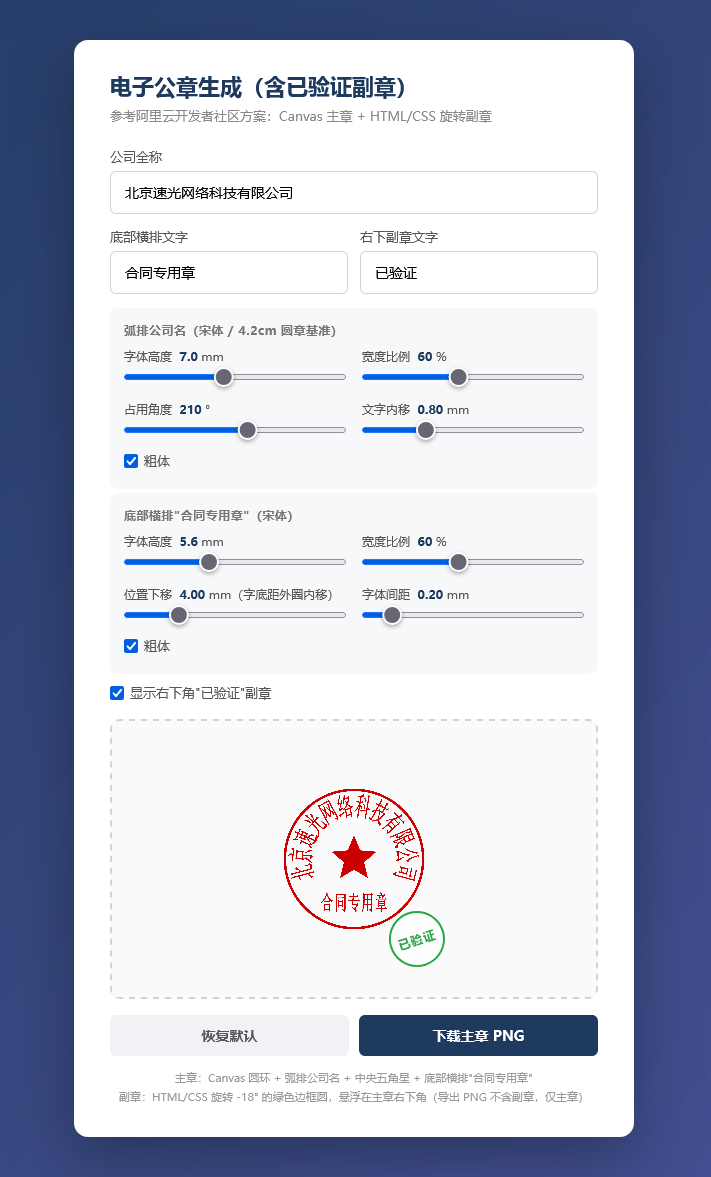
效果图:
相关案例查看更多


Copyright © 2020-2030 速光网络软件开发 版权所有 Powered by EyouCms
备案许可号:京ICP备20025512号-8